RestorePhotosApp Review: The Complete Guide to AI Photo Restoration in 2026
Complete RestorePhotosApp review covering AI photo restoration, pricing ($4.99-$49.99), bulk restoration, FAQ, and real-world use cases. Restore old photos in seconds.
Introduction
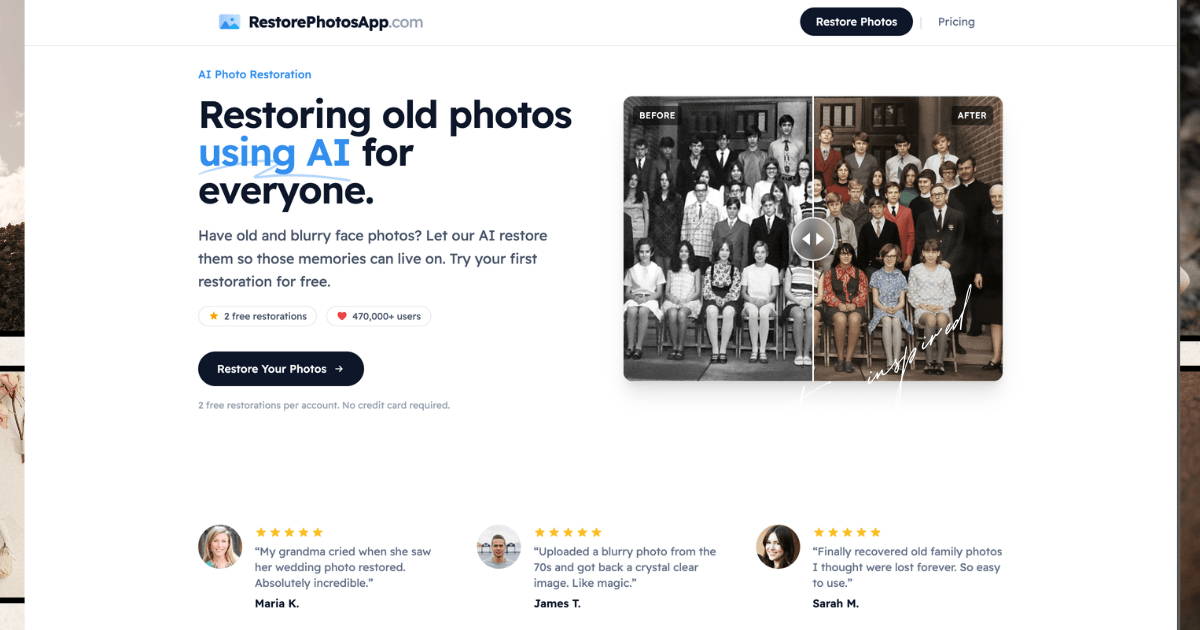
Vintage photographs are fragile memories. Years of storage damage them—fading, scratches, blur, and discoloration transform treasured family moments into barely-recognizable images. Professional photo restoration studios charge $50 or more per image, making it unrealistic for people with entire albums to restore. RestorePhotosApp solves this problem with AI-powered photo restoration at a fraction of the cost, allowing over 470,000 users to bring old photos back to life.
This comprehensive review covers everything you need to know about RestorePhotosApp, from how it works to pricing, real-world use cases, and answers to frequently asked questions.
What Is RestorePhotosApp?
RestorePhotosApp is a cloud-based AI photo restoration service that uses advanced machine learning to repair damaged, blurry, and faded photographs. The platform specializes in face photo restoration, automatically removing scratches, noise, blur, and other damage while preserving the original character and expression of subjects.
Unlike traditional photo editing software that requires design skills, RestorePhotosApp runs entirely in your browser. You upload a photo, select a restoration style, and download the high-resolution result—all in under 30 seconds. No installation, no subscriptions, no credit card required to start. It's built for everyday people who want professional results without the complexity.
How RestorePhotosApp Works
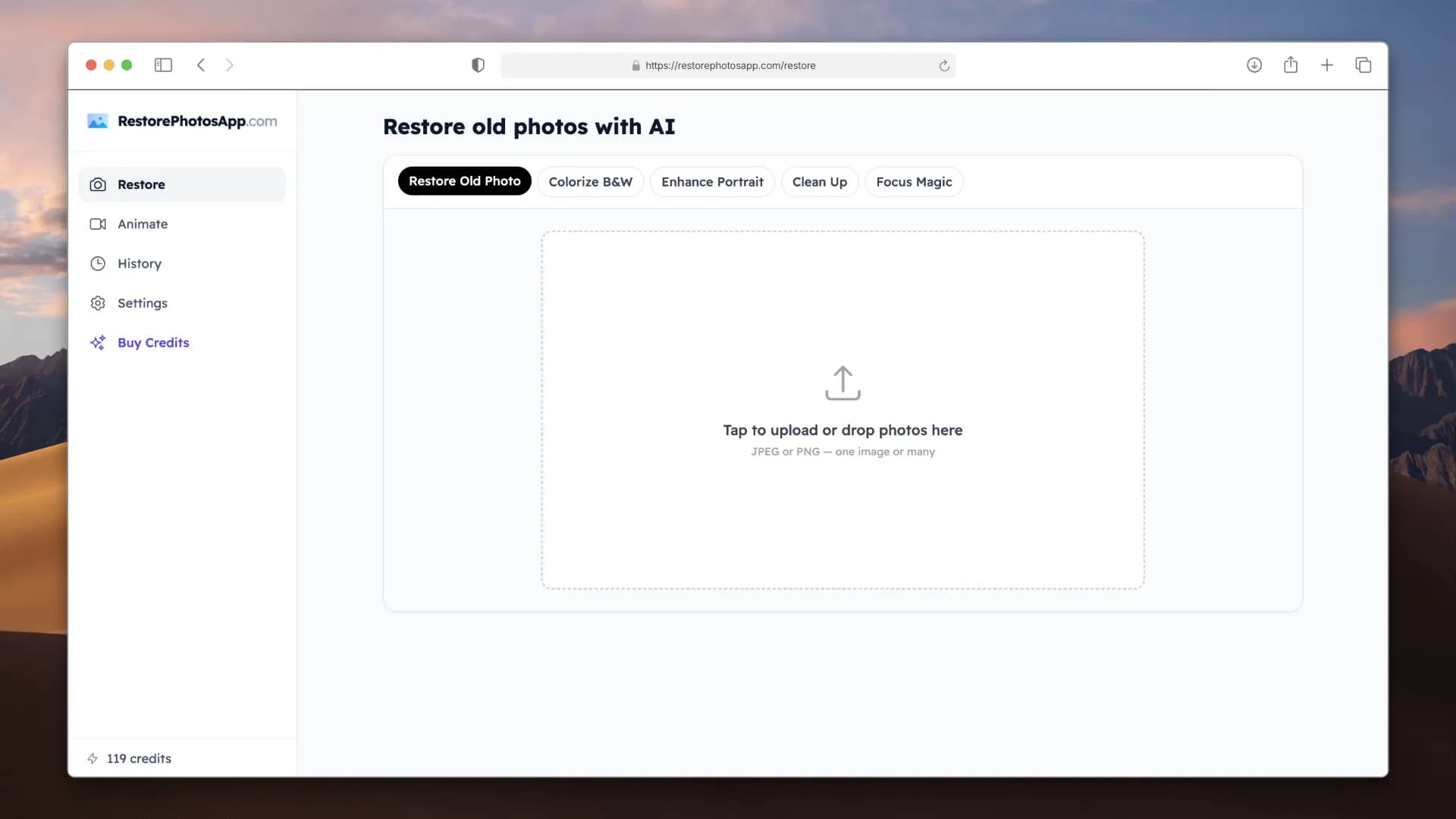
The restoration process is straightforward and requires three simple steps. First, you upload your damaged photo directly to the platform through your browser. The file is immediately processed securely over HTTPS. Next, you choose a restoration style from multiple options: Restore for general damage repair, Colorize to add realistic color to black-and-white photos, Sharpen for blurry images, Enhance for general improvement, and Cleanup for scratch and noise removal.
Behind the scenes, RestorePhotosApp's AI analyzes the photograph pixel by pixel. The model has been trained on millions of photographs to recognize faces, edges, textures, and damage patterns. It understands how natural skin tones should appear, how fabric colors age, and how to reconstruct sharp facial features from degraded originals. The AI doesn't just apply filters—it intelligently rebuilds missing information based on patterns learned from high-quality reference images.
Within seconds, your restored photo is ready to download in full resolution. You can then save it, print it, or share it online. All processing happens in the cloud on Cloudflare R2 servers, so your original file never leaves your device unless you choose to upload it.
Before & After Example
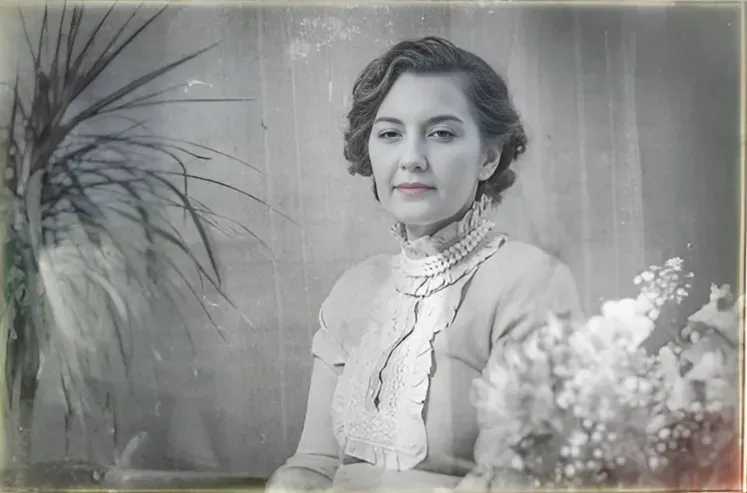
Before Restoration – Faded, low contrast, with visible damage

After Restoration – Crisp, vibrant, with all damage removed and colors recovered
Bulk Photo Restoration: Restore Entire Albums at Scale
One of RestorePhotosApp's most powerful features is its ability to handle bulk photo restoration. Instead of restoring photos one at a time, you can upload multiple damaged photos at once and process your entire collection simultaneously. This makes it practical to restore boxes of old photos, entire wedding albums, or decades worth of family pictures in a single session.
With the Family plan at 150 credits or the Studio plan at 450 credits, bulk restoration becomes economical. Rather than deciding which photos matter most and only restoring a handful, you restore your complete collection. Every wedding photo, every childhood moment, every milestone gets rescued from fading and damage.
The workflow is the same: upload multiple photos, select your restoration style, and let the AI process them in parallel. With hundreds or thousands of photos in your archive, this bulk capability saves hours compared to professional restoration services that charge per-image fees.
RestorePhotosApp Pricing: Affordable Photo Restoration
RestorePhotosApp operates on a credit-based pricing model with no monthly subscriptions. Every plan is a one-time purchase, and credits never expire. This makes it ideal for both casual users restoring a handful of cherished photos and professionals handling entire archives.
| Plan | Price | Credits | Cost Per Photo | Best For | 30-Day Refund |
|---|---|---|---|---|---|
| Starter | $4.99 | 10 | $0.50 | Testing the service | Yes |
| Pro | $14.99 | 30 | $0.50 | Small collections | Yes |
| Family | $19.99 | 150 | $0.13 | Entire albums (Best Value) | Yes |
| Studio | $49.99 | 450 | $0.11 | Professionals & power users | Yes |
Starter Plan: $4.99
The Starter plan includes 10 credits, which equals 10 photo restorations. At $0.50 per credit, this plan is perfect for trying out the service on a few precious family photographs before committing to a larger package. You get high-resolution output, and credits never expire, so you can use them whenever you're ready. Every purchase includes a 30-day money-back guarantee, making this a risk-free way to test whether RestorePhotosApp delivers the results you need.
Pro Plan: $14.99
The Pro plan steps up to 30 credits for $14.99, bringing the per-credit cost to $0.50. This plan suits small collections—a wedding album, a box of baby pictures, or a year's worth of family events. Like all plans, you receive high-resolution 1080p output and unlimited credit validity. Many users find this plan strikes the right balance between cost and quantity for typical restoration needs.
Family Plan: $19.99 (Best Value)
The Family plan offers 150 credits for $19.99, dropping the per-credit cost dramatically to just $0.13—a 74% savings compared to the Starter plan. This is RestorePhotosApp's best value for most users. Whether you're restoring an entire family photo collection spanning decades or helping relatives digitize their archives, 150 credits covers substantial restoration work without excess waste. The 30-day money-back guarantee still applies, and credits remain valid indefinitely. Perfect for bulk photo restoration of complete albums.
Studio Plan: $49.99
The Studio plan targets professionals, photographers, and power users with 450 credits for $49.99—just $0.11 per credit, representing a 78% saving over starter pricing. At this tier you also gain priority customer support, making it ideal if you're handling large-scale restorations for clients or your entire family collection spanning multiple generations. The complete archive of old photos, military records, and inherited collections becomes manageable at this price point.
Money-Back Guarantee
All plans include RestorePhotosApp's 30-day money-back guarantee. If you're not satisfied with the restoration quality, you can request a full refund within 30 days. This removes financial risk from trying the service.
Key Features and Capabilities
RestorePhotosApp specializes in several distinct restoration tasks, each addressable through different style options.
Blur Removal and Sharpening: Blurry photos plague phone users, old film cameras, and motion-capture scenarios. The Sharpen style uses AI to reconstruct sharp facial details from soft originals. Out-of-focus portraits become crisp, making old phone photos look professional and childhood Polaroids clear enough to recognize subjects. The unblur image feature specializes in fixing soft and out-of-focus photographs that seemed permanently damaged.
Colorization of Black-and-White Photos: The Colorize style converts monochrome images into realistic color. Rather than randomly guessing colors, the AI predicts natural skin tones, fabric colors, and background hues based on what it learned from millions of colored reference images. Wedding photos from the 1950s, military portraits from decades past, and old family pictures regain their lost color dimension. RestorePhotosApp also offers specialized colorization of old photos and can handle sepia-toned images effectively.
Scratch and Damage Repair: The Cleanup and Restore styles remove scratches, dust, creases, water damage, and general degradation. Photos that survived in attics, basements, or boxes accumulate years of damage. RestorePhotosApp's AI intelligently fills in damaged areas using surrounding pixel information and learned patterns about what objects should look like. The service can repair water-damaged photos, torn photos, and creased photos.
Face-Focused Restoration: Unlike generic photo filters, RestorePhotosApp specifically optimizes for face photographs. It prioritizes facial feature clarity, skin texture, and expression preservation. This makes it exceptional for portraits, wedding photos, graduation pictures, and family events—the photos people actually care about preserving. The AI photo enhancer and photo upscaling features specifically target facial detail preservation.
Bulk Photo Restoration: For users with hundreds of photos, RestorePhotosApp processes multiple images without requiring separate uploads for each one. Once you purchase credits, you can restore as many photos as your credit balance allows, with processing speed limited only by how fast you can upload files. This is ideal for restoring complete family collections, inherited archives, or entire albums spanning decades.
Real-World Use Cases
RestorePhotosApp serves diverse restoration scenarios across personal and professional contexts.
Family Photo Collections
Families with boxes of old photographs spanning generations use RestorePhotosApp to digitize and restore their archives. A stack of faded color prints from the 1980s, damaged black-and-white photos from the 1920s, and everything in between can be restored at scale using one of the larger credit packages. These restored digital copies then become part of family history—shared with relatives, printed for gifts, or preserved in digital archives for future generations. The bulk restoration feature makes handling large collections practical and affordable.
Wedding Photography
Wedding photographers sometimes encounter damaged originals from clients' archives. A bride's grandmother's wedding photo from 1955 arrives faded and creased. Rather than expensive professional studio restoration, photographers can restore these photos in seconds using RestorePhotosApp and present the result as a gift or keepsake. Many users specifically restore wedding photos to create beautiful reprints for framed displays in their homes.
Military and Graduation Portraits
Formal portraits from military service, high school graduation, or professional ceremonies often develop fading or damage over decades. Military families especially preserve these photos as legacy items. RestorePhotosApp's face-focused restoration excels here, bringing clarity and color back to formal portraits that matter deeply to families. The school photo restoration feature specifically handles yearbook and class photos.
Baby and Childhood Photos
The photos parents treasure most—baby pictures, childhood moments, school portraits—accumulate damage over years. Originals fade, get creased in albums, or deteriorate in storage. Restoring these images creates clear digital backups and prints suitable for framing. Many parents restore childhood photos to create personalized gifts for adult children or to document family history.
Vintage and Antique Photography
Photography enthusiasts collecting vintage and antique prints use RestorePhotosApp to improve condition without professional intervention. Daguerreotypes, tintypes, cabinet cards, and early color processes all respond to AI restoration. Collectors can evaluate the true appearance of subjects and scenes without damage interfering with visual assessment. The platform also handles sepia photo restoration effectively.
Polaroid Photos
Polaroids present unique restoration challenges—they fade unpredictably, develop chemical degradation, and crack easily. RestorePhotosApp handles Polaroid restoration effectively, recovering the original colors and details that time fades away. Users with boxes of Polaroids from vacations, parties, and events can economically restore the entire collection using a Family or Studio plan.
Scanned Photos and Digital Transfers
When people scan old photographs or digitally photograph old prints with their phones, results often appear soft, slightly out of focus, or show lighting inconsistencies. RestorePhotosApp's Sharpen and Enhance styles improve these digital captures, making scanned photos look as good as professional scanning services would produce.
Frequently Asked Questions About RestorePhotosApp
How does AI photo restoration actually work?
RestorePhotosApp's AI is trained on millions of high-quality photographs. When you upload an image, the neural network analyzes faces, edges, textures, and color patterns. It identifies damage areas by comparing them to its learned understanding of what undamaged photos should look like. The model then reconstructs missing or degraded information—filling scratches, removing blur through intelligent edge enhancement, and removing noise while preserving fine details. The entire process runs in cloud servers using Cloudflare R2 infrastructure and completes in under 30 seconds.
Can I really restore old photos for just $4.99?
Yes. The Starter plan is genuinely $4.99 for 10 restorations. This low entry price exists because RestorePhotosApp operates at massive scale—processing thousands of photos daily distributes server costs across many users. Professional photo restoration studios charging $50+ per photo operate with much lower volume. If you're testing the service or only need to restore a few photos, the Starter plan is completely viable. For multiple photos, the Family plan at $19.99 for 150 images offers much better value—just $0.13 per photo compared to $0.50.
Why No Free Trial?
RestorePhotosApp could offer free trials, but instead offers the Starter plan at just $4.99. The company's reasoning: you receive full commercial rights and ownership of all restored photos. This low barrier-to-entry plan lets you test quality on real photos before committing more money. You pay a tiny amount, but you own every restored image. Free trials that watermark results or restrict usage don't provide this value.
What photo types work best?
RestorePhotosApp works optimally with face photographs—the category people most want to preserve. This includes family portraits, wedding photos, graduation pictures, military portraits, baby photos, school photos, ID photos, and more. It handles black-and-white, sepia, and color photographs from virtually any era, including Polaroids and film scans. Landscape photos and photos without faces are possible but not optimized. The platform specializes in human portraiture because that's what matters most to users.
How long does restoration actually take?
Most photos process in under 30 seconds. Upload time depends on your internet connection and file size, but processing itself is fast because RestorePhotosApp uses powerful GPU servers in the cloud. You don't wait in queues. There's no manual human editing step. You upload, select a style, and download almost immediately. This speed advantage over professional studios is one of the service's biggest appeals.
Can the service really colorize black-and-white photos realistically?
Yes, and the results often surprise people with their accuracy. The Colorize style predicts natural skin tones based on facial structure and lighting patterns. It estimates fabric colors from texture patterns. It reconstructs background hues using context clues. While no colorization is 100% historically accurate (the AI makes educated guesses), results look authentic enough for display and sharing. The AI errs on the side of natural, neutral colors rather than producing unbelievable results.
Does the service actually sharpen blurry photos?
The Sharpen style reconstructs facial details from soft originals through super-resolution AI techniques. Out-of-focus portraits become noticeably crisper. Motion blur reduces significantly. However, Sharpen has limits—extremely blurry photos where facial details are nearly unrecognizable may show less dramatic improvement than moderately blurry photos. The AI reconstructs details based on what it learned from sharp reference images, but severe blur provides limited information to work with.
Are my photos actually private and secure?
RestorePhotosApp processes files over HTTPS encryption and stores them on Cloudflare R2 infrastructure. The company explicitly states it never shares photos with third parties or uses them to train AI models. Photos are kept for 30 days so you can access your restoration history, then automatically deleted permanently. Your original uploaded photo and the restored version are both deleted after 30 days unless you download and save them. For additional security requirements, review the complete privacy policy and data processing agreement on the website.
What resolution can I download?
The Starter and Pro plans deliver high-resolution 1080p output. For larger original files, the service maintains the original resolution during restoration. Downloaded photos are suitable for reprinting at any size from wallet prints to large framed portraits. Professional print labs typically recommend 1080p or higher for sharp reproduction, and RestorePhotosApp meets this standard across all plans.
Are there cheaper ways to restore photos?
Free online photo restoration tools exist but typically deliver lower quality results with heavy watermarking. Professional photo restoration studios cost $50 to $200+ per image. DIY restoration using Photoshop requires expensive software and significant skill. RestorePhotosApp provides a middle ground—affordable ($0.13 per photo on the Family plan), high-quality results, and zero learning curve. Adjusted for quality and convenience, it's likely cheaper than professional studios and far superior to free tools. The 30-day money-back guarantee removes financial risk.
Do my credits ever expire?
No, credits never expire. If you purchase the Family plan today but only restore 50 photos in the first month, your remaining 100 credits remain available indefinitely. Use them on your schedule. This distinguishes RestorePhotosApp from subscription services charging monthly fees regardless of usage.
Can I print the restored photos?
Absolutely. Downloaded restored photos are high-resolution image files suitable for any printing method. Many users specifically restore old wedding, graduation, and military photos to reprint them as gifts. The restored digital file becomes your master copy—you can print copies, modify them further, share them digitally, or archive them without quality loss.
Do I need software installed to use RestorePhotosApp?
No. The entire service runs in your web browser on desktop, tablet, or mobile devices. Nothing requires download or installation. You navigate to restorephotosapp.com, upload a photo, select a style, and download the result. This works on Windows, Mac, iPhone, Android, or any device with a web browser.
Comparing RestorePhotosApp to Alternatives
Several competing services offer photo restoration or colorization. RestorePhotosApp competes directly with Remini, MyHeritage In Color, VanceAI, and Hotpot.ai. Compared to these alternatives, RestorePhotosApp offers lower per-image pricing, no subscription requirement, permanent credit validity, and faster processing speeds. Many users test multiple services and choose RestorePhotosApp based on superior quality and value.
RestorePhotosApp also provides detailed guides comparing photo restoration costs versus professional studios and explores professional photo restoration apps available today.
The Bottom Line
RestorePhotosApp solves a real problem at an honest price. Treasured old photographs don't have to stay damaged. For $4.99 to $49.99, you can restore dozens to hundreds of photos without expensive professional services or complex software. The AI delivers professional-quality results in seconds.
Whether you're preserving family history, restoring wedding photos, colorizing black-and-white pictures, or digitizing your entire collection, RestorePhotosApp makes it accessible. The 30-day money-back guarantee lets you try the service risk-free. For anyone with old photographs worth preserving, RestorePhotosApp is worth your time and money.

Building a weekly discovery platform for indie makers. Follow the journey on @mavenonx