
Compress.FAST Review 2026: The Complete Guide to Fast, Free File Compression
Compress.FAST review 2026: Free online tool compresses images, PDFs & documents up to 80% without quality loss. EU servers, 50 files/day free. Rating: 4.8/5
What Is Compress.FAST? An In-Depth Overview
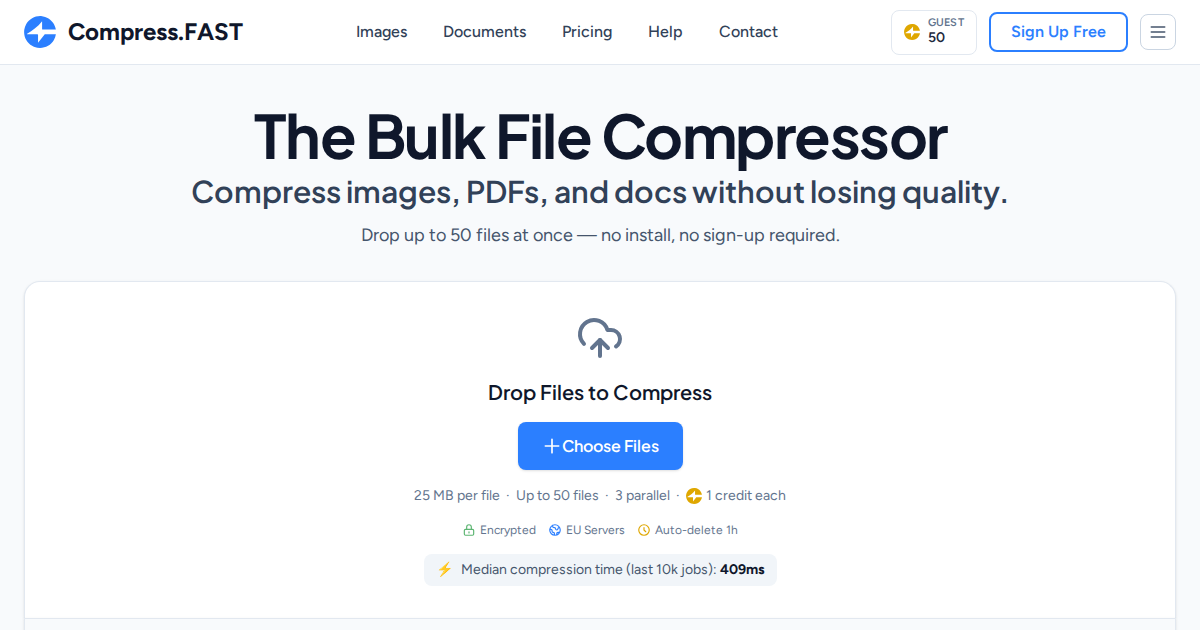
Compress.FAST is a powerful web-based file compression platform that enables users to reduce file sizes by up to 80% without visible quality loss. Unlike traditional compression tools that require software downloads or complicated installations, Compress.FAST operates entirely in your browser, processing files on secure European Union servers with military-grade encryption.
The platform stands out in the crowded file compression market by supporting over 40 different file formats, including popular image types (JPG, PNG, WebP, HEIC, GIF, TIFF, BMP), 26 RAW camera formats for professional photographers, and critical business documents like PDFs, Microsoft Word files (DOCX), and PowerPoint presentations (PPTX).
What makes Compress.FAST particularly noteworthy is its commitment to quality preservation. The platform uses advanced optimization algorithms that carefully compress files without introducing visible artifacts, compression noise, or formatting issues. PDFs remain fully searchable with intact hyperlinks and functional form fields, while Word and PowerPoint documents retain complete editability with all formatting preserved.
Key Features That Set Compress.FAST Apart
Batch Processing Capabilities
One of Compress.FAST's most powerful features is its robust batch processing system. Instead of compressing files one at a time—a tedious process that wastes valuable hours—users can upload and compress multiple files simultaneously. The free tier allows 50 files per batch with 3 parallel processing jobs, while Business plan subscribers can handle up to 1,000 files per batch with 10 parallel jobs running concurrently.
This batch compression capability transforms workflows for professionals who regularly handle large volumes of files. Photographers returning from a shoot with hundreds of high-resolution images, marketing teams preparing campaign assets, or web developers optimizing entire image libraries can process everything in minutes rather than hours.
Enterprise-Grade Security and Privacy
In an era where data privacy concerns dominate headlines, Compress.FAST takes security seriously. Every file uploaded to the platform benefits from multiple layers of protection. Files are encrypted in transit using TLS 1.3 (the latest transport security protocol) and encrypted at rest using AES-256 encryption, which is the same standard used by government agencies and financial institutions worldwide.
All processing occurs exclusively on servers located within the European Union, ensuring compliance with GDPR and other stringent EU data protection regulations. The platform implements a strict auto-delete policy, permanently removing all uploaded files from servers after just one hour. This means your sensitive business documents, client photos, or personal files never linger on external servers indefinitely.
Perhaps most importantly, Compress.FAST processes everything in-house with zero third-party involvement. Your files never pass through external APIs, cloud services, or data processors, eliminating additional privacy risks.
Format Support: More Than Just Images
While many compression tools focus exclusively on images, Compress.FAST supports a comprehensive range of file types that cover most professional and personal needs.
Image Formats: JPG, PNG, WebP, AVIF, HEIC, GIF, TIFF, BMP, ICO, PSD, and an impressive 26 RAW camera formats including CR2, NEF, ARW, and DNG. This extensive RAW support makes Compress.FAST particularly valuable for professional photographers using Canon, Nikon, Sony, and other high-end camera systems.
Document Formats: PDF compression maintains document structure, searchability, metadata, hyperlinks, and form functionality. Word documents (DOCX) compress without affecting editability, formatting, embedded images, or document structure. PowerPoint presentations (PPTX) shrink significantly while preserving animations, transitions, embedded media, and slide formatting.
After compression, most files retain their original format. Images like JPG, PNG, and PDF stay as-is, while some image formats convert to JPG for optimal compression (transparent images automatically convert to PNG to preserve transparency).
Compress.FAST Use Cases: Who Benefits Most?
Professional Photographers and Visual Artists
Photographers face a constant challenge: delivering high-quality images to clients while managing file size constraints for email, web galleries, and storage systems. Compress.FAST solves this problem elegantly by reducing RAW and high-resolution JPEG files by 60-80% without introducing visible quality degradation.
A wedding photographer shooting 2,000+ images per event can batch-compress an entire gallery before delivery, dramatically reducing upload times to client portals and making downloads faster for customers. Studio photographers preparing images for e-commerce clients can meet strict file size requirements without compromising the detail needed to showcase products effectively.
Web Developers and Digital Marketers
Website performance directly impacts search engine rankings, user experience, and conversion rates. Every megabyte matters when optimizing page load speed. Web developers use Compress.FAST to optimize image assets, reducing bandwidth consumption and improving Core Web Vitals scores that Google uses for ranking.
Digital marketers creating email campaigns benefit from smaller image attachments that don't trigger email size limits or get blocked by corporate mail servers. Social media managers can compress graphics for faster uploads to platforms like Instagram, Facebook, and LinkedIn while maintaining visual quality across devices.
Small Business Owners and Remote Teams
Small businesses without dedicated IT departments need simple, reliable tools for everyday document management. Compress.FAST helps businesses reclaim expensive cloud storage space by shrinking archived documents, contracts, invoices, and presentations without losing any functionality.
Remote teams collaborating across time zones and bandwidth constraints can share compressed files that upload and download faster, improving productivity and reducing frustration with slow file transfers. The ability to compress entire folders of meeting materials, project documentation, or client deliverables in one batch streamlines collaboration workflows.
Content Creators and Bloggers
Content creators publishing articles, tutorials, or portfolio pieces need optimized images that load quickly without sacrificing visual appeal. Compress.FAST enables bloggers to maintain professional-looking photography and graphics while achieving the fast page loads that both readers and search engines demand.
YouTubers and video creators can compress thumbnail images and supporting graphics for faster uploads to video platforms. Podcasters sharing show notes with embedded images benefit from smaller file sizes that improve user experience on mobile devices with limited bandwidth.
Students and Educators
Academic work increasingly requires submitting assignments through learning management systems with strict file size limits. Students can compress research papers with embedded images, presentation projects, or portfolio submissions to meet platform requirements without removing content or compromising quality.
Educators sharing course materials, lecture slides, or visual resources with entire classes can compress files for easier distribution via email or course websites, ensuring all students can access materials quickly regardless of internet connection speed.
Compress.FAST Pricing Plans: Detailed Breakdown
Free Plan: No Credit Card Required ($0/month)
The free tier provides genuinely useful functionality without the typical "freemium" limitations that make tools unusable. You receive 50 credits daily (refreshing at midnight UTC), with each file counting as 1 credit. This translates to 50 files compressed per day—enough for most personal users and occasional professional needs.
The free tier provides genuinely useful functionality without the typical "freemium" limitations that make tools unusable. You receive 50 credits daily (refreshing at midnight UTC), with each file counting as 1 credit. This translates to 50 files compressed per day—enough for most personal users and occasional professional needs.
Free Plan Specifications:
- Maximum file size: 25 MB per file
- Batch processing: Up to 50 files simultaneously
- Parallel jobs: 3 files processing at once
- Credits: 50 per day (resets at midnight UTC)
- Processing priority: Standard queue
- Support: Email assistance
- No sign-up required: Start compressing immediately
The "no sign-up required" approach deserves emphasis. You can visit Compress.FAST, drag files into the browser window, and start compressing without creating an account, providing an email address, or entering payment information. However, creating a free account unlocks additional benefits like compression history tracking and a personal credit pool.
For freelancers with occasional compression needs, students working on projects, or personal users organizing photo libraries, the free plan provides substantial value without ongoing costs.
Pro Plan: For Independent Professionals ($9/month)
The Pro plan targets freelancers, independent contractors, and small business owners who regularly work with larger files and higher volumes. The monthly subscription unlocks the entire Tools.FAST network, meaning your $9 investment covers not just Compress.FAST but also Convert.FAST and future tools in the ecosystem.
Pro Plan Specifications:
- Maximum file size: 200 MB per file (8x larger than free)
- Batch processing: Up to 200 files simultaneously (4x more than free)
- Parallel jobs: 6 files processing at once (2x faster)
- Credits: 10,000 per month across all Tools.FAST services
- Processing priority: High (faster queue processing)
- Support: Email and chat assistance
- Subscription scope: Entire Tools.FAST network
With 10,000 monthly credits at 1 credit per file, Pro users can compress up to 10,000 files monthly. For context, that's approximately 333 files per day, which is enough to handle substantial professional workflows. A graphic designer managing multiple client projects, a real estate agent processing property photos weekly, or a marketing consultant optimizing campaign assets would find this allocation more than sufficient.
The increased file size limit (200 MB) accommodates high-resolution photography, detailed architectural renderings, or comprehensive presentation decks without requiring pre-compression or format changes.
Business Plan: Production-Scale Operations ($19/month per seat)
The Business plan addresses the needs of agencies, production teams, and organizations processing files at scale. The $19 monthly cost per seat remains remarkably affordable considering the dramatic increase in capacity and priority processing.
Business Plan Specifications:
- Maximum file size: 1 GB per file (40x larger than free)
- Batch processing: Up to 1,000 files simultaneously (20x more than free)
- Parallel jobs: 10 files processing at once (maximum speed)
- Credits: 30,000 per month across all Tools.FAST services
- Team features: Add seats to invite team members
- Processing priority: Highest (fastest queue processing)
- Support: Priority email and chat assistance
- Subscription scope: Entire Tools.FAST network
Business users can compress 30,000 files monthly, which translates to roughly 1,000 files daily if distributed evenly. This capacity supports creative agencies processing client deliverables, e-commerce businesses optimizing product catalogs, or publishing companies preparing digital assets for distribution.
The 1 GB file size limit handles virtually any file type professionals encounter, including uncompressed video frames, extensive PDF manuals with embedded graphics, or massive presentation decks with high-resolution images.
The multi-seat functionality enables team collaboration with centralized billing and usage tracking. A marketing department can add seats for designers, content creators, and social media managers, providing everyone access while maintaining budget control and usage visibility.
How Compress.FAST Credit System Works
Understanding the credit system ensures you select the right plan and avoid unexpected limitations. The system operates on straightforward principles designed for transparency and predictability.
Credit Basics:
- Standard cost is 1 credit per file (exact cost shown before processing begins)
- Monthly refresh means credits renew on your billing cycle date
- Rollover policy allows unused credits to carry forward, capped at your monthly allocation
- Network-wide credits work across Compress.FAST, Convert.FAST, and future tools
- Real-time display keeps your current credit balance always visible in your dashboard
The rollover feature provides valuable flexibility. If you compress 8,000 files one month on a Pro plan, your remaining 2,000 credits roll into the next month, giving you 12,000 total credits available. However, rollover caps at your plan's monthly amount, preventing indefinite accumulation.
This credit architecture benefits users with variable workloads. A photographer might compress 15,000 files during busy wedding season (using rolled-over credits) and just 5,000 during slower winter months, with credits accumulating for future heavy-usage periods.
Performance and Processing Speed
Compress.FAST earns its name through genuinely fast processing speeds that outpace many competitors. The platform leverages optimized compression algorithms, distributed server infrastructure, and efficient parallel processing to deliver results quickly.
Processing times vary based on file type, size, and current server load, but typical performance includes standard photos (5-10 MB) processing in 2-5 seconds per image, large images (20-50 MB) taking 5-15 seconds per image, PDF documents (10-30 MB) completing in 10-20 seconds per document, and Office documents (5-20 MB) finishing in 5-15 seconds per file.
Batch processing with parallel jobs dramatically accelerates overall workflow. A Pro user compressing 200 photos with 6 parallel jobs completes the entire batch in minutes rather than the hours required for sequential processing or manual compression in desktop software.
The priority queue system ensures paid subscribers receive faster processing during peak usage times. Business plan users at the highest priority level experience minimal wait times even during heavy platform usage.
Compression Quality: Balancing Size and Fidelity
The fundamental value proposition of any compression tool lies in achieving significant file size reduction without unacceptable quality degradation. Compress.FAST excels in this critical area through careful optimization strategies tailored to each file type.
Image Compression Quality
For photographic images (JPG, PNG, WebP), Compress.FAST typically achieves 60-80% file size reduction while maintaining visual quality indistinguishable from the original to most viewers. The platform employs perceptual quality algorithms that prioritize the aspects of images human eyes notice most while aggressively compressing elements that contribute minimally to perceived quality.
Edge sharpness, color accuracy, and tonal gradations remain intact even at high compression ratios. Images suitable for web publishing, social media, email attachments, or digital portfolios emerge from compression looking virtually identical to originals while loading dramatically faster and consuming less storage.
For professional photography requiring absolute maximum quality preservation (such as fine art prints or commercial licensing), users should evaluate compressed samples before committing entire collections. However, for the vast majority of digital uses, the quality-to-compression ratio proves excellent.
PDF Compression Integrity
PDF compression presents unique challenges because documents must maintain functional elements beyond visual appearance. Compress.FAST successfully reduces PDF file sizes while preserving critical features including searchable text layers, clickable hyperlinks, bookmarks, form fields, and document metadata.
A 50 MB PDF manual might compress to 15 MB without losing any searchability, navigation functionality, or form fill capabilities. This makes compressed PDFs ideal for email distribution, web downloads, or archival storage where both accessibility and efficiency matter.
Office Document Compression
Microsoft Word and PowerPoint file compression maintains complete editability. The compressed file opens in Office applications with all formatting, styles, embedded images, and structural elements intact. Users can continue editing text, modifying layouts, and updating content exactly as they would with the original file.
This contrasts sharply with some compression approaches that convert documents to static formats or flatten embedded elements, destroying editability. Compress.FAST preserves the working document while simply optimizing internal assets like embedded images for efficiency.
User Experience and Interface Design
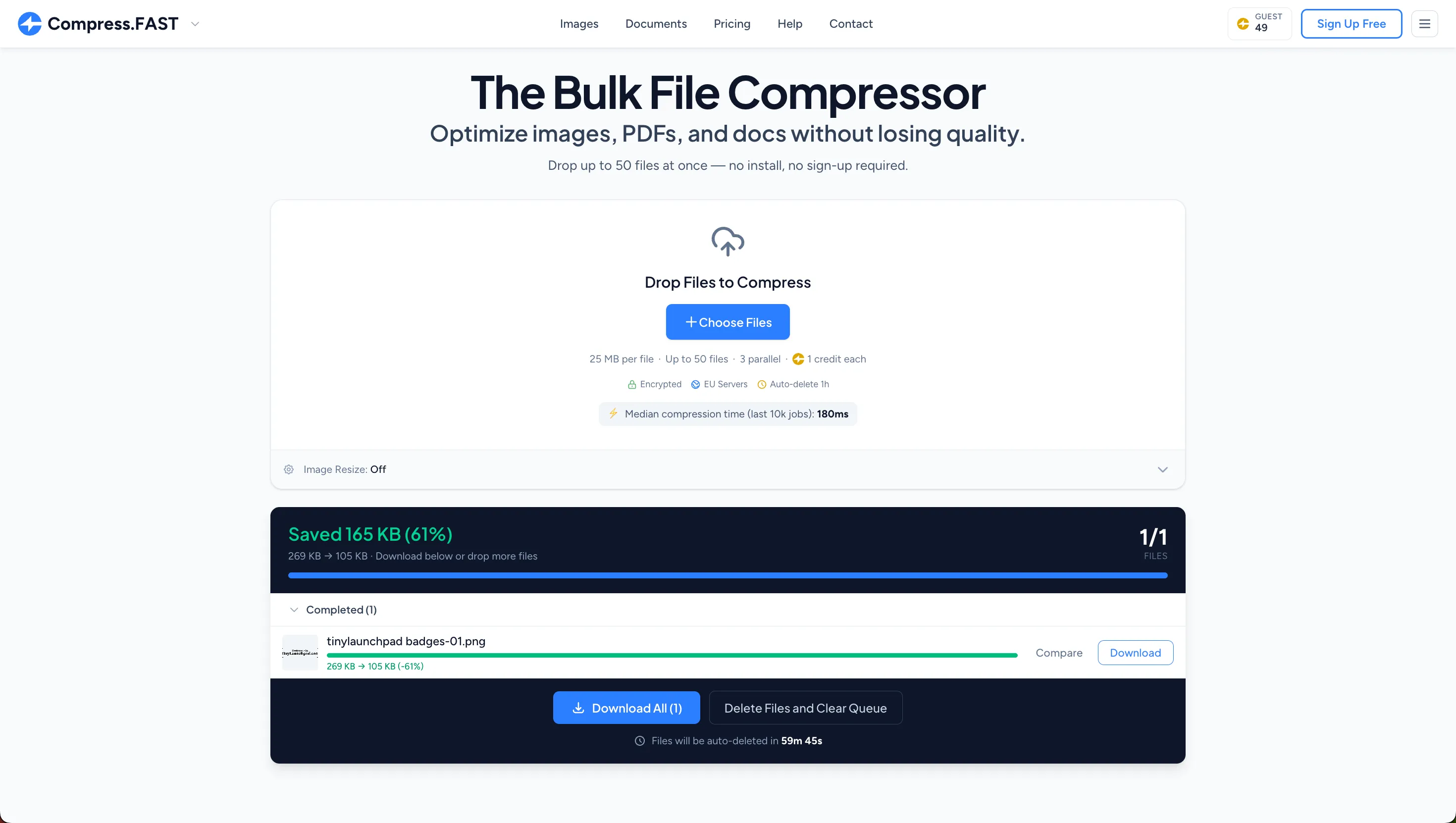
Compress.FAST prioritizes simplicity and speed in its interface design, minimizing friction between users and results. The workflow requires just three steps: drop files, wait for processing, and download compressed results.
Drag-and-Drop Simplicity
The main interface features a prominent drop zone that accepts files from desktop folders, File Explorer windows, or Finder windows. Users can select multiple files simultaneously or drag entire folders for batch processing. The interface immediately validates files, displaying format support and any size limit issues before processing begins.
Visual feedback accompanies every action. Upload progress bars show transfer status, processing indicators display compression progress for each file, and completion notifications appear when results are ready. Users never question what's happening or whether the platform is working.
Download Options and Flexibility
After compression completes, Compress.FAST offers flexible download options. Users can download files individually (useful when only specific compressed files are needed) or download everything as a single ZIP archive for convenient bulk retrieval.
File naming remains consistent with originals, eliminating confusion about which compressed file corresponds to which original. The interface clearly displays original file size versus compressed size, showing the exact reduction percentage achieved for each file.
Mobile Responsiveness
The web-based platform functions across devices including smartphones and tablets. Mobile users can compress files directly from their device galleries or cloud storage apps, making Compress.FAST practical for on-the-go optimization when working remotely or traveling.
Compress.FAST vs. Competitors: Comparative Analysis
The file compression market includes numerous alternatives ranging from desktop software to web services. Comparing Compress.FAST against popular competitors reveals distinct advantages in specific areas.
Advantages Over Desktop Software
Traditional compression software like Adobe Photoshop, JPEG Optimizer, or dedicated PDF compressors require installation, updates, and local processing. Compress.FAST eliminates these requirements with browser-based access that works on any operating system without software installation, automatic updates without user intervention, and server-side processing that doesn't burden local computer resources.
Desktop software typically handles files one at a time or requires complex batch scripting. Compress.FAST provides intuitive batch processing without technical configuration.
Advantages Over Free Online Compressors
Many free online compression tools exist, but most impose severe restrictions including limited file sizes (often under 10 MB), single-file processing only, advertising-heavy interfaces, unclear data retention policies, and conversion to watermarked outputs on free tiers.
Compress.FAST's free tier provides genuinely useful limits (25 MB files, 50-file batches) without watermarks, advertising, or compromised privacy. The transparent one-hour deletion policy and EU server processing address privacy concerns that plague many free alternatives.
Competitive Disadvantages
Compress.FAST focuses specifically on compression rather than comprehensive file manipulation. Users needing format conversion, advanced editing, or specialized processing might require additional tools. However, the Tools.FAST network addresses this through Convert.FAST and planned future services, all accessible with a single subscription.
The credit-based system, while transparent and fair, does create usage limits that could constrain extremely high-volume users. Organizations processing hundreds of thousands of files monthly might require enterprise solutions with unlimited processing.
Security and Privacy: A Deeper Look
Given the sensitive nature of many compressed files—client photos, business documents, financial records—security and privacy merit detailed examination.
Data Encryption Standards
Compress.FAST implements defense-in-depth security with multiple protective layers. TLS 1.3 encryption protects files during upload and download, preventing interception during transmission. AES-256 encryption secures files at rest on servers, ensuring stored data remains protected even in the unlikely event of server compromise.
These encryption standards represent current best practices, offering protection equivalent to that used by major financial institutions and government agencies handling classified information.
EU Data Residency
Server location matters significantly for privacy and regulatory compliance. By processing all files exclusively on European Union servers, Compress.FAST subjects itself to GDPR, which represents some of the world's strictest data protection regulations. EU data residency provides additional protections beyond those available in many other jurisdictions.
For European businesses and organizations, this EU processing addresses data residency requirements that prohibit transferring personal or sensitive data outside the EU. For global users, it provides strong privacy protections regardless of local regulations.
Automatic File Deletion
The one-hour automatic deletion policy ensures temporary file storage rather than indefinite retention. After compression completes and users download results, files remain accessible for one hour before permanent deletion. This minimizes exposure windows and ensures files don't accumulate on external servers.
The automatic nature of deletion removes human error from the equation. There's no reliance on manual processes or retention policies that might be overlooked. Files systematically purge after the specified timeframe without exception.
No Third-Party Processing
Unlike platforms that route files through external APIs, cloud services, or partner processors, Compress.FAST handles everything in-house. This eliminates the privacy risks and data sharing concerns inherent in multi-party processing chains where files pass through systems beyond the primary platform's control.
Users can verify this through the platform's transparent privacy policy and security documentation available on the website.
Common Questions and Troubleshooting
Will Compression Work for My Specific Files?
Compress.FAST optimizes compression algorithms for each supported format. However, compression effectiveness varies based on file characteristics. Already-compressed formats like highly optimized JPEGs or PDFs might see minimal additional reduction, while uncompressed or lightly compressed files typically achieve dramatic size reductions.
To evaluate compression effectiveness for your specific files, test representative samples using the free tier before committing to paid plans. The platform shows exact compression results before download, allowing informed decisions.
What Happens If a File Fails to Compress?
Occasionally files may fail compression due to corruption, unusual formatting, or extreme file characteristics. Failed files appear clearly marked in the results interface with explanation messages. The platform doesn't charge credits for failed compressions, ensuring users only pay for successful processing.
If critical files consistently fail, the email and chat support team can investigate specific issues and provide solutions or workarounds.
Can I Recover Deleted Files After One Hour?
No. The one-hour automatic deletion is permanent and irreversible. This strict deletion policy protects user privacy but requires users to download compressed files promptly. Compressed files should be downloaded immediately upon processing completion to avoid loss.
Does Compress.FAST Use My Files for AI Training?
Absolutely not. Compress.FAST does not use uploaded files for AI training, algorithm improvement, or any purpose beyond the specific compression service requested. Files are processed, stored temporarily, and permanently deleted without any additional use.
This policy is documented in the platform's privacy policy and represents a firm commitment to user privacy and data protection.
Getting Started with Compress.FAST: Step-by-Step Guide
Immediate Use Without Account Creation
Visit compress.fast in any modern web browser. The home page displays the file drop zone immediately. Drag files from your computer directly into the drop zone or click to browse and select files. Multiple files can be selected simultaneously for batch processing.
After uploading, processing begins automatically. Progress indicators show compression status for each file. When processing completes, download files individually or as a single ZIP archive. Downloaded files are the compressed versions ready for immediate use.
This workflow requires no account creation, no email verification, and no payment information.
Creating a Free Account for Enhanced Features
While account creation isn't required, registering a free account provides benefits including personal credit pool management, compression history tracking, faster access to saved preferences, and easier transition to paid plans if needed.
Account creation requires only an email address and password. No credit card is required for free accounts. After registration, you can immediately start using your 50 daily credits with full account features enabled.
Upgrading to Paid Plans
Upgrading from free to Pro or Business plans happens instantly through the account dashboard. Click "Upgrade" on any plan card, enter payment information (credit card or other accepted methods), and confirm the subscription. Credits and enhanced limits apply immediately without waiting periods.
Subscriptions operate on monthly billing cycles from the upgrade date. The platform clearly displays the next billing date and current credit balance in the account dashboard. Subscription management, billing history, and plan changes are all accessible through the account interface.
Final Verdict: Is Compress.FAST Worth Using?
Compress.FAST delivers on its core promise with reliability and efficiency that justify both free and paid usage. The platform's greatest strengths include genuinely useful free tier without restrictive limitations, excellent compression quality balancing size reduction and visual fidelity, robust security and privacy protections exceeding most competitors, straightforward pricing with transparent credit system, and batch processing capabilities that transform workflows for volume users.
For individual users with occasional compression needs, the free tier provides exceptional value. The 50 daily credits, 25 MB file size limit, and 50-file batch processing handle most personal use cases without ongoing costs.
For professionals such as photographers, designers, marketers, and developers, the Pro plan at $9 monthly offers remarkable value. The ability to compress 10,000 files monthly with 200 MB file sizes and access to the entire Tools.FAST network justifies the investment for anyone regularly optimizing files.
For organizations and teams, the Business plan's $19 monthly cost per seat delivers production-scale capabilities (1 GB files, 1,000-file batches, 30,000 monthly credits) that support serious operational workflows while remaining affordable compared to enterprise alternatives.
The platform's commitment to EU-based processing, automatic deletion, and in-house processing addresses privacy concerns that should matter to anyone handling sensitive files. The transparent security practices and clear privacy policies build trust that many free alternatives simply cannot match.
Minor limitations exist. Users needing format conversion alongside compression will want the broader Tools.FAST ecosystem. Those processing hundreds of thousands of files monthly might exceed even Business plan credits. The web-based approach requires internet connectivity that some specialized workflows might lack.
These limitations affect specific use cases but don't diminish the platform's value for its target audience: individuals and businesses needing reliable, secure, efficient file compression without complexity or excessive cost.
Compress.FAST earns a strong recommendation for anyone regularly working with files that need optimization. The free tier provides immediate value for testing and occasional use, while paid plans deliver professional capabilities at reasonable prices. Whether you're compressing a few vacation photos or processing thousands of client deliverables, Compress.FAST handles the task with the speed and quality its name promises.
Overall Rating
⭐⭐⭐⭐⭐ (4.8/5)
Pros:
- Genuinely useful free tier with 50 daily credits
- Excellent compression quality without visible loss
- Strong EU-based security and privacy protections
- Supports 40+ file formats including RAW images
- Fast batch processing capabilities
- No software installation required
- Transparent pricing with clear credit system
Cons:
- Credit limits may restrict extremely high-volume users
- Web-based tool requires internet connectivity
- Limited to compression (conversion requires separate tool)
Best For: Photographers, web developers, marketers, small businesses, and anyone needing regular file optimization with strong privacy protections.
Try Compress.FAST: Get started immediately at compress.fast with no sign-up required, or view detailed pricing plans for professional and business use.
Want your product reviewed by Maven?
Get a professional review, deep-dive analysis, and high-Dofollow backlink to boost your SEO and credibility. Join hundreds of successful launches.


Building a weekly discovery platform for indie makers. Follow the journey on @mavenonx

![SalesPopups Review 2026: Stripe Social Proof Tool [4.9★]](https://vxymowrrcaevvlbbmrqg.supabase.co/storage/v1/object/public/blog/salespopups-review.webp)